Validity, expiry and renewal
Rights required: Can create and modify certificates.
Validity, expiry and renewal
Rights required: Can create and modify certificates.
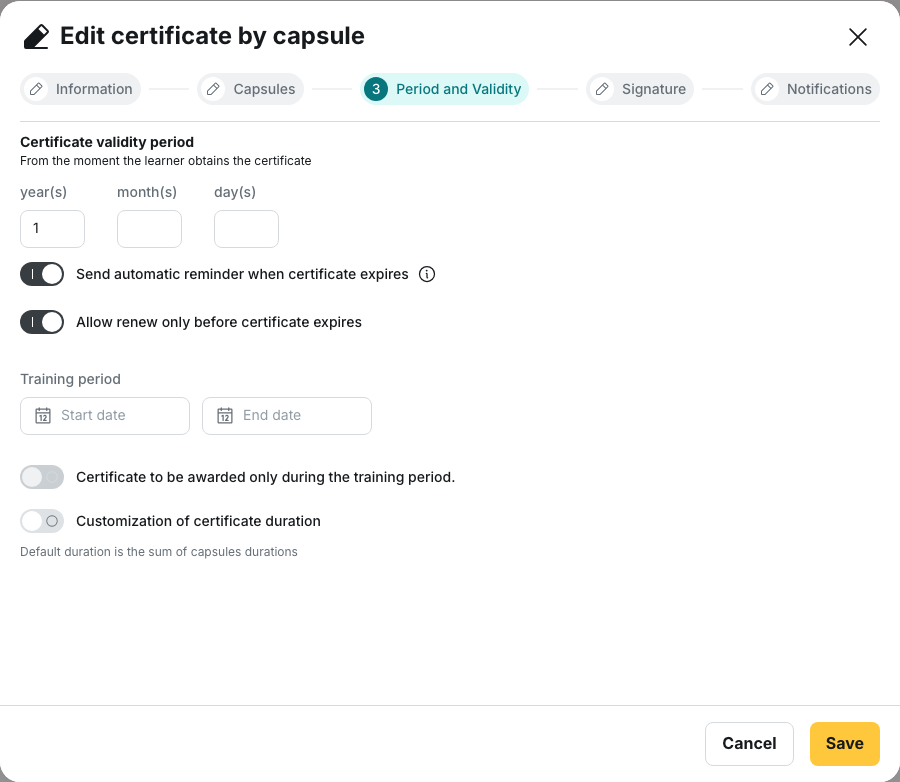
Everything that has to be renewed (trade certifications, safety procedures, annual compliance) rests on three settings at the Period and Validity step of a capsule-based certificate: the validity period, the automatic reminder and early renewal.
Only capsule-based certificates expire
The wizard for a skill-based certificate has no Period and Validity step: no duration, no reminder, no renewal. The certificate is earned for good and its document carries no end date. That is not a settings detail, it is a selection criterion: a certification that has to be renewed has to be a capsule-based certificate.
The duration is entered in years, months and days
Certificate validity period offers three fields: year(s), month(s), day(s). The subtitle states the rule: “From the moment the learner obtains the certificate”. Every learner therefore has their own expiry date, counted from their own award date. There is no shared deadline.
Months are entered below 12 and days below 30: beyond that, use the field above. What you type is then converted into a number of days, counting 365 days per year and 30 days per month. That conversion is what the platform stores, so a duration expressed in years does not follow the calendar exactly. Two years is stored as 730 days, which lands one day past the anniversary date whenever a 29 February falls inside the window.
⚠️ Left empty, the duration never expires and the two switches below do not even appear. That is the default, and a trade certification created without a duration stays valid forever. Setting a duration afterwards does not fix the past: certificates already issued without an expiry stay without one.
When a certificate expires exactly
The countdown starts from the day of the last activity that validates the certificate, not from the moment the platform notices it. The award date is rounded down to the start of that day, then the stored number of days is added, so validity ends at midnight Coordinated Universal Time (UTC), which is one or two in the morning in France depending on the season.
⚠️ The date printed on the document is the first day of invalidity. The End date of validity: line shows the day validity ends, at zero hours: a one-year certificate obtained on 1 June 2026 carries the date 1 June 2027 and is already out of validity on that day. Quote the day before to an auditor.
Under Reward → Certificate, the learners list of a certificate shows Expires on, then Expired on once the date has passed. The certificate is not deleted, it is flagged.
The automatic reminder
Send automatic reminder when certificate expires. The switch only appears once a duration is set.
- The message goes out after expiry, never before: no advance notice exists in the platform.
- It goes out once per learner and per certificate, with no second attempt.
- Expired certificates are swept every hour, so the reminder follows expiry within the hour.
Recipients are not chosen here. The tooltip says so: “Recipients will be those defined at the notifications step”. If that step names nobody, nothing goes out and the reminder still counts as sent.
⚠️ On a certificate you have just created, the reminder is on while the switch looks off. To turn it off for good, switch it on and then off again before saving. Reopen the certificate and the switch shows the real state.
Early renewal
Allow renew only before certificate expires. With the switch off, a learner cannot re-earn their certificate until the current one has expired: they redo the capsules and nothing happens. With it on, they recertify as soon as they do what is needed.
💡 Turn it on for anything seasonal or constrained by the field, where the team cannot wait for the anniversary date to renew its certification.
What recertifying requires
Capsules already counted towards one certificate no longer count towards the next. Reopening a capsule completed last year without redoing it triggers nothing: it takes new completions, above the success threshold. The platform also applies a floor date to the activity it keeps:
- first award: activity more recent than the validity period, so a certificate valid for one year ignores what was completed eighteen months ago;
- renewal, switch off: activity later than the expiry of the previous certificate;
- renewal, switch on: activity later than the award of the previous certificate.
⚠️ Tell the learners. “I already did this training” is the normal reaction, and without an explanation it reads as a platform defect.
Going further
- Creating a capsule-based certificate: the success threshold, which decides what counts as validating activity.
- Rewards analytics: the Expired certificates column, worth looking at before the deadline rather than after.
- Sending, resending and exporting: the manual reminder, the one that copies in the Team Leader.
- Certificate templates: where to place the end of validity on the document.