Model 2: distribution through tracks
⚠️ Required permissions: you must be able to edit the relevant learning path and access the groups you want to distribute it to. Without these permissions, the Distribution tab remains available in read-only mode and displays the following message: “You do not have the permissions required to edit this learning path. Please contact your administrator for assistance.”
Model 2: distributing content through learning paths
⚠️ Required permissions: you must be able to edit the relevant learning path and access the groups you want to distribute it to. Without these permissions, the Distribution tab remains available in read-only mode and displays the following message: “You do not have the permissions required to edit this learning path. Please contact your administrator for assistance.”
To learn more, see Who can distribute what?.
In this model, the learning path is the unit of distribution. You create a learning path, make it available to specific groups, and learners access the capsules through that learning path.
Distribution is therefore configured at learning path level, rather than capsule by capsule.
Understand the access rules
For a learner to access a capsule through a learning path, three conditions must be met:
- the capsule must be added to a learning path. A capsule can belong to several learning paths;
- the learning path must be associated with a group the learner belongs to;
- the capsule must have the Online status. A capsule in Draft or Pending approval remains unavailable, even if the learning path has been distributed correctly.
If a learner cannot access the expected content, check these three conditions in this order.
Configure learning path distribution
The relationship between a learning path and its groups can be viewed and managed from several screens.
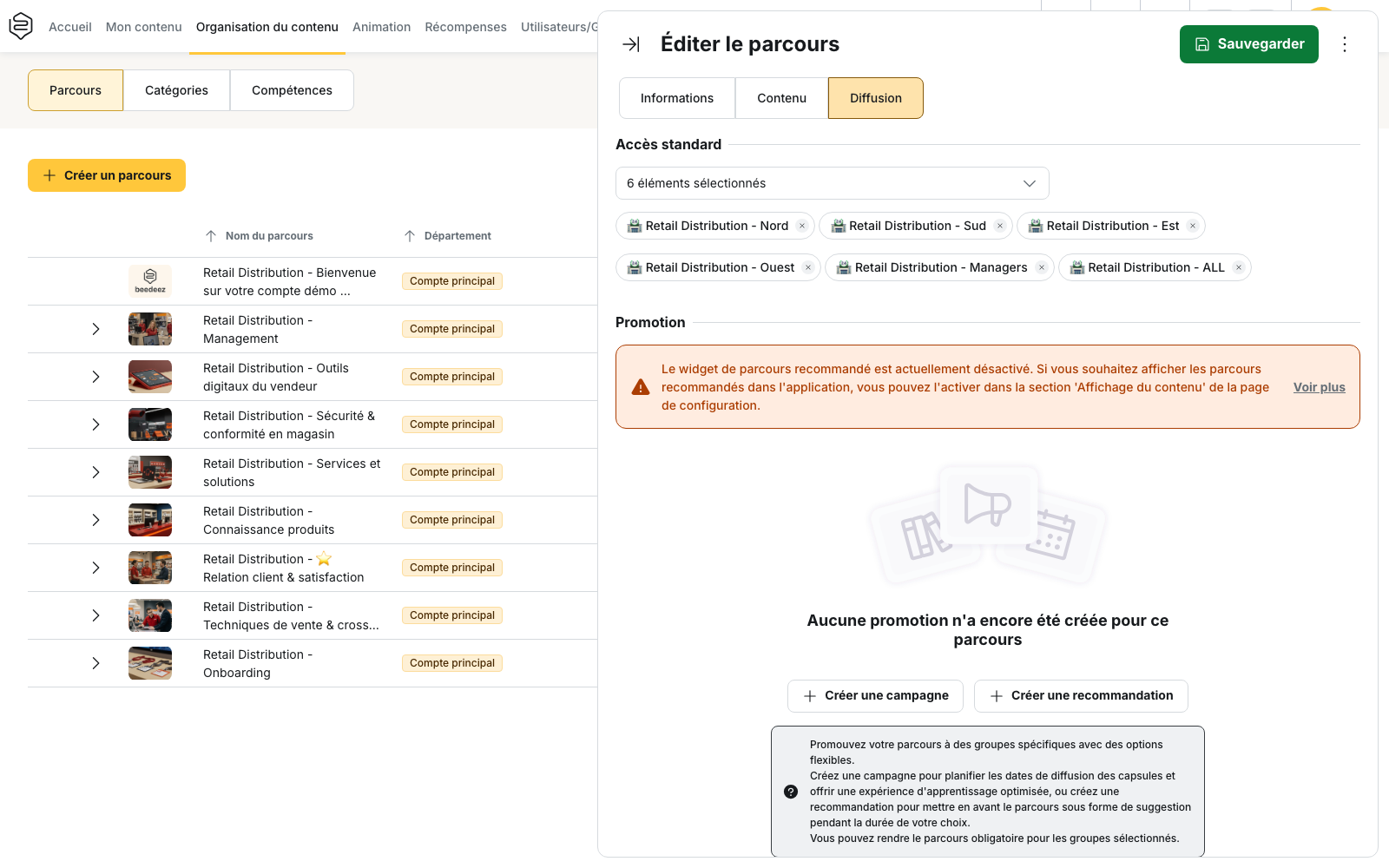
From the learning path
Open the learning path, then go to Distribution > Standard access.
Use Add a group to select the groups that should have access to the learning path.
This is the main screen for defining a learning path’s audience. To learn more, see Distribute a learning path to groups.
From the group
Open the group, then view the Associated learning paths panel.
This shows the same relationship from the group’s perspective, making it easier to check which learning paths are available to a specific population.
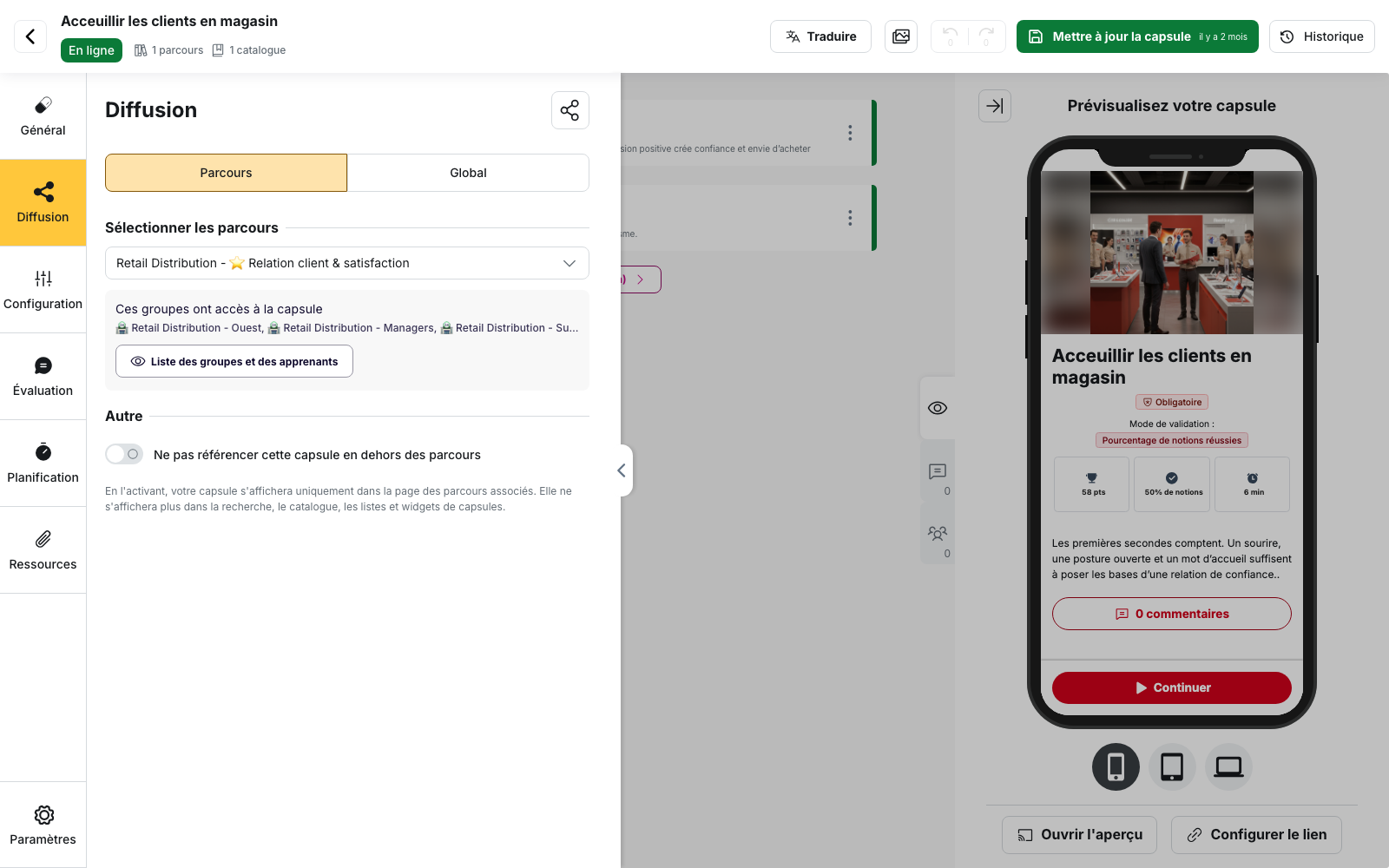
From the capsule
Open the capsule, then go to Distribution > Learning paths.
The Select learning paths section shows which learning paths the capsule belongs to. The These groups have access to the capsule section then lists the groups that can access it through those learning paths.
If the selected learning paths are not associated with any group, the back office will indicate this.
What the learning path controls
Once the learning path has been distributed, several settings are managed directly at learning path level.
Content order
Capsules and sub-learning paths can be reordered by drag and drop. This order defines the learning journey presented to the learner.
To learn more, see Organize the content of a learning path.
Success conditions
The Learning path validation mode, available in the Information tab, determines which capsules must be passed and, depending on the selected mode, the threshold that must be reached.
A learning path can therefore be considered passed even if not all of its capsules have been passed.
Statistics
Because the learning path is distributed to an identified audience, several indicators can be used to track progress:
- Penetration rate;
- Completion rate;
- Success rate;
- detailed learner-level results.
To understand how these indicators are calculated, see Content statistics.
What learning path distribution does not do
It does not publish capsules. A capsule in Draft or Pending approval remains unavailable to learners, even when it belongs to a distributed learning path.
It does not send notifications automatically. Adding or removing a group from a learning path does not notify learners. To inform them, see Notify learners about newly available content.
It does not let you distribute only part of a learning path. When a learning path is made available to a group, its entire structure is distributed, including sub-learning paths. Access to individual capsules still depends on their own status and access rules.
Points to watch
A permission restricted to a specific selection does not expand automatically. If a permission model only grants access to selected groups or learning paths, groups and learning paths created later are not automatically added to that selection.
On accounts organized by department, several groups may be required to cover the full population. Select the relevant groups from each department rather than assuming that a single group covers the entire account.
When to use learning path distribution
Learning path distribution requires you to manage two elements: the learning paths themselves and the groups they are associated with.
In return, it lets you define a clear audience for each learning path. You can then track statistics for that population, monitor progress and send reminders to the relevant learners.
The other distribution models address different needs:
- global availability requires less configuration and works well for content that learners can access freely, but it does not define a specific audience to track;
- custom distribution by group gives you finer control over access to the same capsule for different groups, but creates more relationships to check when troubleshooting distribution issues.
When to choose another model
- For reference content that learners can access freely, without any expectation that they complete it, use global availability.
- If access to the same capsule needs to vary between groups, use custom distribution by group.
- Avoid creating a learning path solely to distribute a single capsule: a learning path should remain a coherent learning unit, for example around a topic, role or stage in a learning journey.
Learn more
- Distribute a learning path to groups: configure Standard access and understand what happens when a group is added or removed.
- Create a learning path: configure the learning path and its validation mode.
- View and manage learning paths linked to a group: check which learning paths are available to a specific population.
- Understand content distribution: compare the different distribution models and choose the one that best fits your needs.