Exporting to SCORM
⚠️ Prerequisite: SCORM export is an add-on option, not included in the base offer. To get it, contact your Beedeez CSM (Customer Success Manager): they are the ones who have the LMS option enabled on your account.
Exporting to SCORM
⚠️ Prerequisite: SCORM export is an add-on option, not included in the base offer. To get it, contact your Beedeez CSM (Customer Success Manager): they are the ones who have the LMS option enabled on your account.
⚠️ Right required: Authorized to generate SCORM exports from capsules and tracks, among the distribution rights. Without it, the Scorm entry does not appear in the share menu.
SCORM is a universal format for learning content, recognised by most LMS platforms on the market. It is used to upload the same content from one platform to another without rebuilding it, and to report back to the host platform what the learner did. Beedeez produces that format: it is the channel to use when your learners go through a platform other than Beedeez. Two entries can appear in the share menu: Scorm, which produces a launcher, and Standalone SCORM, which packages the content itself. In both cases you get a ZIP file to upload into your LMS. The three ways of making both tools coexist are compared in Distributing your content in an LMS.
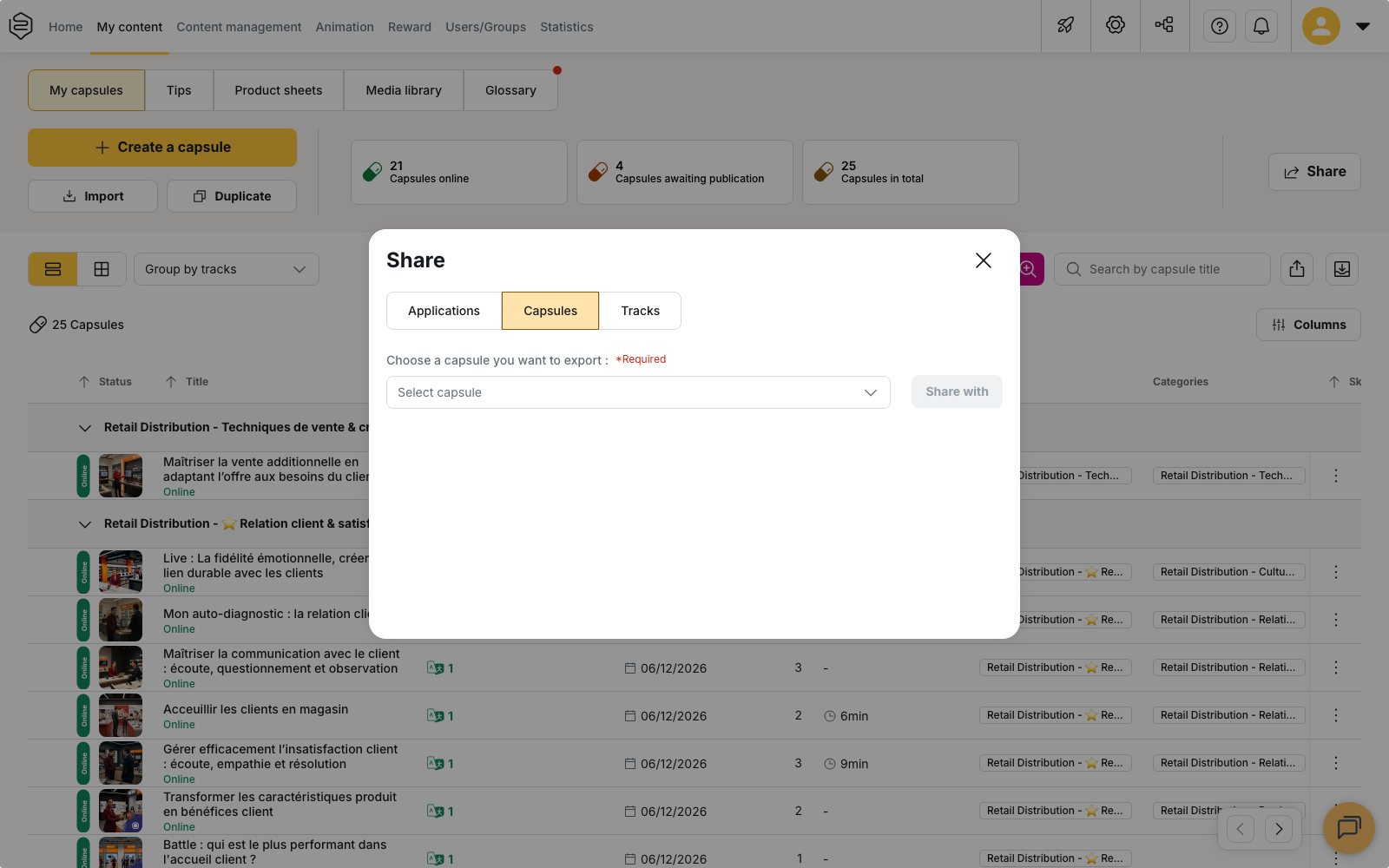
Running the export
- Click Share, at the top right of your content.
- Open the Capsules tab or the Tracks tab.
- Select the content to export.
- Click Share with, then choose Scorm.
- Set the options described below.
- Click Export the scorm. The ZIP downloads.
Choosing the version
The SCORM Version field offers SCORM 1.2, selected by default, and SCORM 2004 4th edition. Choose the one your LMS accepts: those are the only two versions produced.
What differs between them is the manifest shipped in the package and the data model your LMS expects. The SCORM 2004 manifest also declares sequencing. If your LMS accepts both, keep the one your other modules already use.
What the package contains
The ZIP produced by Scorm contains the manifest and a launch page. It does not contain the content.
On start, that page opens the Beedeez player in a frame, inside the LMS. Three direct consequences:
- The content stays current. A capsule edited in Beedeez changes for everyone, with no re-export and no re-upload.
- The learner needs a connection. The package does not work offline.
- Statistics keep being recorded in Beedeez.
What the LMS receives
During the session, the package sends back the score obtained, the time spent, the success status and the completion status of the content.
In return, it reads the learner identifier and name supplied by the LMS. That identifier is what finds the matching Beedeez account, or creates it if none exists yet.
⚠️ Check which identifier your LMS sends before a wide rollout. If it does not match the identifier your Beedeez accounts are built on, learners arrive on new accounts instead of their own.
What the export does not send
The LMS receives no detail: neither question-by-question results, nor capsule-by-capsule progress within a track. An exported track reports a single line, for the whole track.
The export does not carry engagement either. Notifications, leaderboards and AI agents stay Beedeez mechanics and never show up on the LMS side.
Making an export expire
The Enable exported SCORM package expiration checkbox reveals an Expiration date field. It is unchecked by default: an export goes out with no end date. The calendar does not accept a date earlier than the day of the export.
⚠️ An expiry date does not remove the file from your LMS. The uploaded package stays there, and taking it down is on you.
The LMS Config selector
If several LMS configurations exist on your account, an LMS Config selector appears above the export button.
⚠️ It does not choose the configuration that will apply. At launch time the calling LMS address decides, matched against the addresses declared in each configuration. If none matches, the default configuration is used. So that list of addresses is what to check with your support team, not the value of the selector.
The standalone SCORM package
The Standalone SCORM entry produces a package that embeds the capsule content, its media and the player. Unlike the Scorm export, it fetches nothing from Beedeez at launch: what you upload into the LMS is frozen as of the export date. A change made to the capsule afterwards does not reach the package already uploaded; you generate a new one.
Three conditions apply on top of those of the Scorm export:
- the Standalone SCORM package option is an add-on option too: ask your CSM to have it enabled on your account, in addition to the LMS option;
- the export applies to capsules only. The entry does not appear on the Tracks tab;
- you must be signed in on the account that owns the capsule. A delegated session can generate the package only if its authorisation template opens the technical integration rights. Otherwise the message Only the direct owner of this capsule can generate a standalone SCORM package. is displayed.
The only option offered is SCORM Version: no expiry, no LMS Config selector.
- Select the capsule, click Share with, then choose Standalone SCORM.
- Choose the SCORM Version your LMS expects.
- Click Generate the standalone SCORM package.
The build runs in the background and can take a few minutes. The download starts on its own once the package is ready. The button then becomes Download the standalone SCORM package: use it if the automatic download was blocked by your browser, or if you had left the window.
A capsule that exists in several languages does not come down as one package, but as an archive holding one SCORM package per language. Unzip it, then upload the language you need into your LMS.
Checking that reporting works
A successful import proves nothing. Play the content end to end with a real learner account of your LMS, then check that the score and the completion status actually arrived. A package can import perfectly and report nothing.
The second trap is the numbers. The LMS and Beedeez both count, and they do not count the same thing. Decide from the start which one is authoritative.
Going further
- Distributing your content in an LMS: compare the one-off export, automated delivery and launch from the LMS
- Automated SCORM delivery to SFTP: when exporting by hand becomes repetitive
- Importing a SCORM module: the other direction, bringing an existing module into Beedeez
- Who can distribute what: the export right and the other distribution rights