Quality and lifecycle
⚠️ Required permissions: you need editing rights for the capsule to access the Publish capsule and Unpublish capsule actions.
Quality and lifecycle
⚠️ Required permissions: you need editing rights for the capsule to access the Publish capsule and Unpublish capsule actions.
A capsule is automatically checked in the editor before it is published. This check verifies that the elements required for publication are present and helps track the capsule throughout its lifecycle.
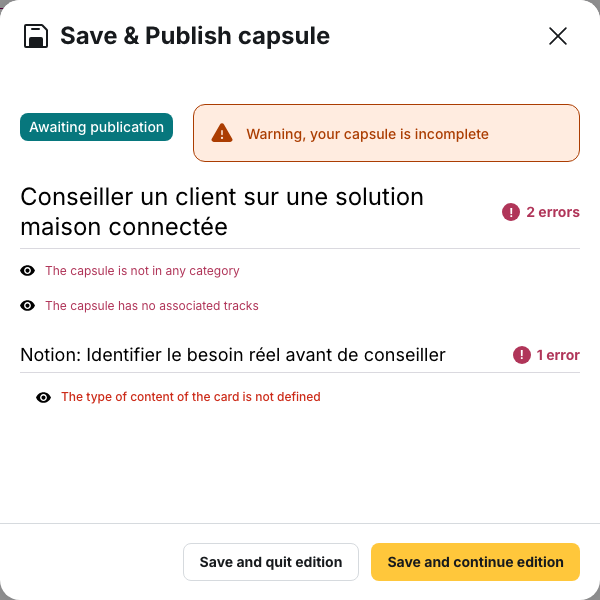
Check the quality report
The report is available in the editor from the Save and publish panel.
It lists the issues that prevent publication. Each line takes you directly to the relevant element so you can correct it.
As long as a blocking issue remains, the Attention, your capsule is incomplete banner is displayed and the Publish capsule button is unavailable.
Issues that block publication
At capsule level
Publication is blocked if:
- the title is empty
- the description is empty
- the capsule does not contain enough chapters, except for session and training interest capsules
- no category is associated with the capsule
- no distribution method is configured: the capsule must be associated with a learning path, displayed in a catalogue using Display in the catalog, or associated with a custom distribution rule containing at least one group
- no notion is defined as the validating notion, or one of the selected notions no longer exists
At notion level
Publication is also blocked when a notion:
- contains neither content nor a quiz
- contains a card where the element required by its type is missing: text, image, audio, document, or SCORM file
- contains a question without a statement
- contains a question without a correct answer
- contains an empty answer option
The quality check mainly verifies that the elements required for publication are present. Content length can generate a warning, but does not block publication.
Length warnings
Some content can be too long or too short without preventing publication.
This includes:
- a title longer than 60 characters
- a description shorter than 50 or longer than 300 characters
- a notion name that is too long
- card text that is too short
- a question statement that is too long
These cases do not appear in the quality report and do not prevent saving or publishing. When available, a character counter simply indicates the length of the content.
⚠️ The title counter and the quality check use different thresholds. The title field accepts up to 67 characters and turns red beyond that limit, while the quality check considers a title too long from 60 characters onwards. In both cases, only an empty title blocks publication.
Capsule statuses
A capsule can have several statuses:
- Draft: the capsule has been created but has never been saved
- Awaiting publication: the capsule has been saved but is not accessible to learners
- Online: the capsule is published
- Deleted: the capsule has been deleted
Unpublish capsule changes an Online capsule to Awaiting publication. This does not delete learners’ progress history.
A deleted capsule can be restored. It then returns to Awaiting publication and must be published again before learners can access it.
⚠️ Publishing a capsule does not necessarily make it visible. If it is distributed through a learning path, that learning path must also be associated with one or more groups.
Edit an online capsule
An Online capsule does not have a separate working version.
Saved changes are therefore applied to learners, including those who have already completed the capsule.
If an online capsule contains a blocking issue, the Save and close and Save and continue buttons are disabled. The associated message indicates that you must first unpublish the capsule.
You can then:
- fix the reported issue
- or unpublish the capsule, make the changes, and publish it again
💡 For regulatory content that needs to be revalidated in a new version, it may be preferable to create a new capsule rather than modify one that learners have already completed. This keeps completion records associated with the content that was actually completed.
Delete and restore a capsule
Deleting a capsule changes its status but does not remove its associations with learning paths.
Deleted capsules remain accessible from See deleted capsules.
Select a capsule and click Restore to recover it.
⚠️ A restored capsule returns to Awaiting publication. It therefore remains invisible to learners until it is published again.
What the quality check does not verify
The quality check verifies the presence and structure of the elements required for publication. It does not verify:
- spelling
- the accuracy of the information
- its relevance
- whether it is up to date
A capsule can therefore pass the quality check while still containing outdated or incorrect information.
The check also does not automatically monitor how old content is. For information with a known validity period, you can use scheduled unpublication. Statistics can also help identify content that is rarely or no longer viewed.